Showing posts with label android. Show all posts

Wednesday, July 3, 2013

Get iOS style gestures on Android

One thing that seriously makes an Android user like me jealous of iOS device owners, is the gestures. I mean, the way to manage a iOS device using gestures is seriously awesome. My favorite is the five-finger pinch to minimize the app. Well, I just got a hunch that there must be something for Android users too. May be an app, well at least made for rooted users.
Hence I found the app called GMD Gesture Control. It features the four-finger pinch to minimize the app, five finger counter clockwise rotation to switch the screen off, three finger slide to open dock and lots more. The app is for rooted users only. You need to root your android phone in order to get this app to work.
Get the app here! Available as a free trial or a paid premium.


Sunday, June 23, 2013

Questions about rooting and Android phone

When using Windows, you find you get different Administrative and System level setting such as Managing Services, Configuring Hardware properties and lots more. When you are using a smartphone, you don't get all these previliges. I know, sideloading the apps(installing apps from different sources eg: SD Card) is an in built feature in android, but sometimes only this is not enough. Rooting allows you to gain system level privileges(permissions to modify system files).
Unlocking the bootloader lets you change kernels in an android phone. This is much much higher way of completely customizing your phone and bringing in all kinds of hardware level changes- which also includes overclocking your CPU!
Now, there's more to it. In recent past, rooting was considered illegal and the phone manufacturers did not support it. They even warned customers about high service charges once you brick your phone using those hardware tweaks. In fact, Amazon pushed over-the-air updates which banned the customers from sideloading apps onto Nook. However, companies like HTC and Google allow their bootloaders to be unlocked and OS also to be change completely. Though you lose warranty, but something enthusiasm is the key to take a risk. Though if you handle your phone carefully and load the apps and roms(different community made android distributions for your phone) verified by the community, you won't have any problems.


Saturday, June 22, 2013

Real Steel Friends

Robot Boxing, something that Real Steel drove people crazy about. I didn't like the movie so much but thought that having a game of such awesomeness would be fun. Making gigantic robots fight using a remote controller. Well, here is the next best thing.

Real Steel friends is a social multiplayer platform that letes you control fighting robots in an arena. Various different challenges on Single Player level and gives you awesome Robot Fighting Experience


The bad part is that there are a lot of things you need to buy in order to upgrade your robot, soemtimes. But playing it is quite awesome and enjoyable!
Get it on


Enjoy!
More in the App Mania!

Sunday, June 9, 2013

Top alternative to Google apps for Windows Phone

Well, we do consider using Windows Phone to be kinda boring. Well, its boring than Android as its got apps that are well, pretty less capability than Android ones. The reason could be that Microsoft developer account costs $99/year. I mean, to get your phone to developer mode, you gotta loosen up your fricking pocket. Strange eh? This is why I think we don't have big of a burst in the Windows Phone marketplace. Hence, slow development and the whooping $99 from pocket per year, LOL, I mean Microsoft, what the hell are you guys thinking about, huh?
Anyways, we can't do many things about it. So, only option that we have is to go for several alternatives:

Google1. Search

Search app is already available from Google in the Marketplace. Its just a small lightweight search app and if you are expecting something like Google Now, no, its nowhere even close to it. The app offers Voice Search and Location based search also. Just below an megabyte in size, the app offers good enough features, but yes, we of course need something more than this. Hope Google comes up with further development so that we get more awesome Google on Windows phone. Click here to get it on Marketplace

2. Google Maps

Google MapsI know how important navigation is on the phone now a days. Google Maps has the best database of almost all locations in the world. Google Maps is not officially available from Google in the Marketplace, hence a third party alternative is what we are considering here. gMaps is one of the best apps having the Maps support of Google. It offers variety of features including directions, the street view and also the cool 3D building views on the maps. My experience with this app was really awesome so far and has helped me a lot. Also, we have a Google Maps app on the Marketplace from Live Maps. To get gMaps, click here to go to the Marketplace. Ad free version is also available.

GDrive3. Google Drive

Google Drive, the cloud file storage tool from this Internet giant showed massive growth due to its features. Frankly speaking no impressive free software is available as the alternative to this. But, if you are willing to give up few features in editing and things: gDocs & gDrive are two free apps. Spend $1.99 Unifiles or $4.99 Insync to get more features.
Soon enough, we might expect a better Google Drive client for Windows Phone once some developer comes up or we have it from Google, which is less likely than finding unicorns right now. Or, you can just transfer your data to Skydrive.


Google Plus Viewer4. Google+

The social networking platform which involves the interconnection of everything social you can do with Google. From Emails to Video conferences. Everything is provided on Google+. Yes, there are apps that can let you manage your Google+ feed and chats. We all know that Hangouts is one of the best features of Google+, and no, Hangout apps are not available on the Marketplace. But still if you like other stuff of Google+, I recommend: Google+Viewer. This app lets you browse your Google+ activities and also view Photos and Videos from your feed. No hangouts, as I said before. Click here to get it on marketplace

Need Google Calendar and Gmail? Use Microsoft Exchange ActiveSync. Add your Google account to the list of accounts on your phone. Here's How:
Start > Apps > Settings > email+accounts > Add Account > Google > Login with your username and password > Choose Email, Contacts and Calender > Hit Sign In!
All your Google events will be visible in the Calendar app and your mail will be available as a separate app of Google Mail.

Well, don't expect it to be Android, because, this is Windows Phone, and you might not get it all...


Saturday, June 8, 2013

How to take screenshot on your mobile device?

Here's how to take screen shot on any mobile operating system if you can't find a Take Screenshot button on the screen or don't want to install any kind of app to do the same.

Android phone (Android 4.0+):
Method: Power button + volume down button (or) Power button + Home Button
Screenshot location: Mostly camera shots, you can find them in Gallery.

iPhone/iPad (iOS):
Method: Power button + Home button
Screenshot location: Camera roll

Windows Phone: 
Method: Power button + Windows key
Screenshot location: Screenshots album in Gallery

If they don't work, comment, I will help you out. More operating systems? Suggest me, you know the comment section is already a lonely place...

Tuesday, July 24, 2012

Music-ify your words!

How about converting your speech and thoughts into an awesome song or a rap?
Well, no experience in music direction is required for these two apps! Just hit record > stop > and then play the auto-composed song.
Songify converts your speech into a song of one of the many tunes available in its market. A really cool app and will impress your friends in a really awesome way.
Requires: Android 2.2+
Requires: iOS 4+

Auto Rap converts your speech into a rap song. Various beats are available including "Love the way you Lie"(by EMINEM). This app is absolutely dope.
Requires: Android 2.2+
Requires: iOS 4+
Tigers love to tug on purple ducks

Monday, July 23, 2012

Your entire life on a timeline

Today, we spend most of our time online. Uploading photos on facebook, checking in on foursquare, updating status on facebook/twitter, sending email, etc. etc.
The guys at Dextera, yes the creators of the Siri clone-iris, have developed an app Friday. The app brings your entire digital life together and displays it in the form of a timeline. You can also search for the things that you want to recall or remember. For example, if you want to know at what all places you went to with your friend and when, the app displays all such activities. An extension called trails tracks all your locations and displays 'em on a map. Many more such extensions will be available in the future, as said.
The concept is cool, and the app is bug-less. Its smart to have one!

Price: Free

Sunday, July 22, 2012

An android launcher which is actually impressive

Well, we have many launchers in Android Market. Some give you extensive customization options like the GoLauncher, ADW Launcher EX, and LauncherPro, while some completely clone the UI of some other OS like the iLauncher (iOS launcher clone) and Launcher7 (brings metroUI on android).
Well, AtomLauncher is of the first category. It gives you addition of widgets, homescreens, etc etc..
The impressive part of this launcher is its new concept of a top bar, which is called the Atom widget. It gives you the date, time or you can also have a search bar in replacement. Right now, it has two themes, but they are enough to give a new stylish look to your phone. Five different types of animations, ability to add many homescreens, customizing grid size are some of the basic features you get with it. Worth a go, with very little lags. The launcher goes great with HoloLocker which transforms your lock screen in the JellyBean style.


AtomLauncher: Get it on Google Play
Requires: Android 4.0+

Thursday, June 21, 2012

Red Bull Augmented Racing Reloaded Short review

We have seen tons of accelerometer-based racing games, where you turn your device to steer. And this is another one in the crowd. But there are a few features in this game that makes it special: Circuit designer, where you can create your own shape of racing tracks. Also, the augmented reality track designer, which draws path as you move a Red Bull can in front of your phone. Cool, isn't it?
You can even share your tracks on facebook and challenge your friends. A pass-and-play mode which is mostly a race-against-time type of racing game.
The game overall is very stable with negligible lags. So, far, I just experienced one, which I doubt was because of my Tablet. The controls are well calibrated. The graphics are beautiful!
But sometimes, you might experience an out-of-control situation while turning, which might get fixed in future versions.


5 out of 5 after the few lags are fixed!

Get it on Google Play
Price: Free

Getting Android to match the iOS

So, you think iOS is smart, well Android can be smarter. But for now, I am just going to share a few ways to  get your android on-level-terms with the iOS device. Though these apps might be available on iOS also, but that's exactly my point :D
The apps I am going to tell you are absolutely free.


  • Security: AVG Free + Smart App Lock
  • Offline reading: Pocket it
  • Social Gaming: There are now tons of games which come with Scoreloop and Openfient. These two frameworks add a lot of social features to your games. You don't need to download any additional app, the features are inbuilt and well connected game-to-game
  • 3D Maps are now up on Google Maps
  • Browser tab syncing is on the Google Chrome mobile browser, and also on Firefox
  • Your contacts are well synced with Google Accounts, but if you want more, Netqin Contacts Backup
  • Voice assistant: SpeakToIt and Google Voice which is in built in most phones. Else, download it from this link
  • Find my phone service: Where's My Droid
  • Wireless Cloud Backup: Google Drive
  • Note making and Taking: Evernote
  • News: and Magazine: Pressreader and Zinio
Anything more you need?


Reasons why I prefer android over iOS

There has been a lot of debate in the world of technology, since the launch of iOS 6, on whether Android can keep up with it. Eventhough Apple has come up with tons of new features, including the "i know it all" Siri, I prefer Android Ice Cream Sandwich more.


Customization:
iOS sucks at this. The way in which an iOS based device can be customized is changing the wallpaper, or creating custom folder. Android on the other hand offers plethora of widgets and awesome launcher replacement tools like GO Launcher, ADW Launcher and my favorite SPB Shell 3D. Even the locker can be customized in Android

Multi-tasking:
Yes, Apple has been trying to incorporate multi-tasking since a long time, but till now this feature is not so impressive. The Android Ice Cream Sandwich is awesome. Especially, the list of apps you get when calling the recent menu. Its quick and does full justice to the title of this comparison.

Flash Support:
Its not only Youtube that uses flash. There are many websites which use flash to display interactive content. Bringing HTML5 full support in Safari is good enough, but flash is flash. We don't have so advance HTML5 applications developed yet.

Developer Tools: 
Android lets you interact with the system at its deepest. You can customize any kind of system file you want. The android developer tools are more well featured than the Apple counterpart. Hell, you can even change the boot screen like Windows on Android. The open source nature of Android gives a lot of freedom to all the developers out there.

Yes, Android doesn't have so many apps pre-loaded in the system. But all the utility counterparts of Apple are available on Google Play. And the best part is most of them are free.

Tell me your views in the comments!

Tuesday, June 19, 2012

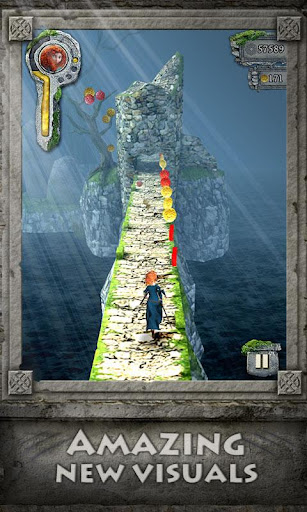
Temple Run Brave Short Review

We all have played and loved Temple Run. Just another phone game with great graphics and sense-making innovative controls.
Temple Run Brave is the same thing. Just that you have better and brighter graphics. The new arrow shooting bonus runs are a really good addition to the better version of the game.
Certainly, the game promotes Disney Pixar's Brave, but Imangi Studios have made this game paid on the Google Play.
There have been no lags, and really smooth gameplay.


Available on:
Get it on Google Play badge, large
  Well, Android guys, here is the APK.