Showing posts with label App Mania. Show all posts

Wednesday, July 3, 2013

Get iOS style gestures on Android

One thing that seriously makes an Android user like me jealous of iOS device owners, is the gestures. I mean, the way to manage a iOS device using gestures is seriously awesome. My favorite is the five-finger pinch to minimize the app. Well, I just got a hunch that there must be something for Android users too. May be an app, well at least made for rooted users.
Hence I found the app called GMD Gesture Control. It features the four-finger pinch to minimize the app, five finger counter clockwise rotation to switch the screen off, three finger slide to open dock and lots more. The app is for rooted users only. You need to root your android phone in order to get this app to work.
Get the app here! Available as a free trial or a paid premium.


Monday, June 24, 2013

Let your Android and PC interact with each other


We often think of handling over the air connections between our devices. For example, controlling PC using an Android phone as remote control or pushing files to the phone without wires, sharing the same clipboard between the two devices for better copy-paste stuff. Well, there are two apps on the market that do the job.

1. Airdroid - Control your android via PC without wires

  • Wonderful PC interface to manage and copy your files
  • Vast scope: Contacts, Music, Pictures, Videos and lots more can be shared and exchanged between PC and any android phone
  • Not so memory hungry, though I suggest you to leave your phone alone when any operation is going on.
  • Send or receive SMS on your computer, and also install APKs directly from your PC to your phone
  • Get it on Google Play now!
  • Connect it over WiFi for a more secure connection, though they have an option for 3G also available

2. Unified Remote - The ultimate remote control for your PC

  • Various kinds of remotes available from Media Player controllers like VLC, Windows Media Player, etc.
  • Custom Remotes, a part of paid app, extends possibilities to highest
  • Responsive input and results, did not encounter any bugs yet
  • Great for giving presentations
  • Yep, APK for the paid version is available, but am not gonna give the link. Find it on Google!
  • Get it on Google Play
  • Also available on Windows Phone

Saturday, June 22, 2013

Real Steel Friends

Robot Boxing, something that Real Steel drove people crazy about. I didn't like the movie so much but thought that having a game of such awesomeness would be fun. Making gigantic robots fight using a remote controller. Well, here is the next best thing.

Real Steel friends is a social multiplayer platform that letes you control fighting robots in an arena. Various different challenges on Single Player level and gives you awesome Robot Fighting Experience


The bad part is that there are a lot of things you need to buy in order to upgrade your robot, soemtimes. But playing it is quite awesome and enjoyable!
Get it on


Enjoy!
More in the App Mania!

Monday, June 10, 2013

Two awesome Chrome Web Apps from Google

Ever thought of making a silent comedy or a your own theme? I certainly had, and Google has once again shown its innovation to the fullest by launching two Chrome experiments that uses the HTML5 canvas to bring the first ever Silent Comedy Movie Maker.

1. Peanut Gallery

The silent movie maker that lets you overlap your voice on old movie clips, and using the Web Speech API, you speech is converted into inter clip Title texts. Its really Awesome! Check out the trailer below. Of course you will be interesting to check it out!

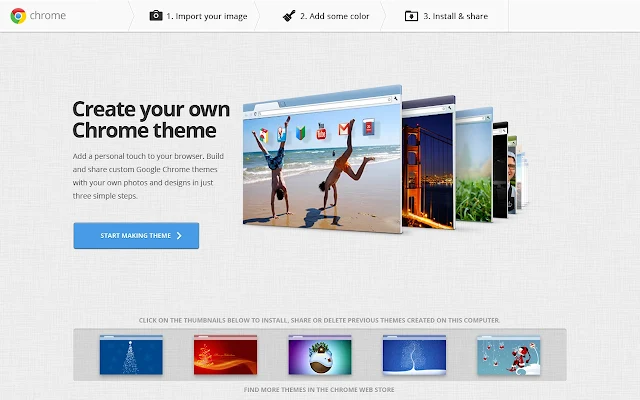
2. My Chrome Theme

Well, the Google Chrome theme maker making the ultimate personalization modification to the browser. The best part that I like is that the Maker just detects colours from the main background you upload and sets the colors using the I'm Feeling Lucky button. Click the image to go to the App details page

Have fun!

Sunday, June 9, 2013

Top alternative to Google apps for Windows Phone

Well, we do consider using Windows Phone to be kinda boring. Well, its boring than Android as its got apps that are well, pretty less capability than Android ones. The reason could be that Microsoft developer account costs $99/year. I mean, to get your phone to developer mode, you gotta loosen up your fricking pocket. Strange eh? This is why I think we don't have big of a burst in the Windows Phone marketplace. Hence, slow development and the whooping $99 from pocket per year, LOL, I mean Microsoft, what the hell are you guys thinking about, huh?
Anyways, we can't do many things about it. So, only option that we have is to go for several alternatives:

Google1. Search

Search app is already available from Google in the Marketplace. Its just a small lightweight search app and if you are expecting something like Google Now, no, its nowhere even close to it. The app offers Voice Search and Location based search also. Just below an megabyte in size, the app offers good enough features, but yes, we of course need something more than this. Hope Google comes up with further development so that we get more awesome Google on Windows phone. Click here to get it on Marketplace

2. Google Maps

Google MapsI know how important navigation is on the phone now a days. Google Maps has the best database of almost all locations in the world. Google Maps is not officially available from Google in the Marketplace, hence a third party alternative is what we are considering here. gMaps is one of the best apps having the Maps support of Google. It offers variety of features including directions, the street view and also the cool 3D building views on the maps. My experience with this app was really awesome so far and has helped me a lot. Also, we have a Google Maps app on the Marketplace from Live Maps. To get gMaps, click here to go to the Marketplace. Ad free version is also available.

GDrive3. Google Drive

Google Drive, the cloud file storage tool from this Internet giant showed massive growth due to its features. Frankly speaking no impressive free software is available as the alternative to this. But, if you are willing to give up few features in editing and things: gDocs & gDrive are two free apps. Spend $1.99 Unifiles or $4.99 Insync to get more features.
Soon enough, we might expect a better Google Drive client for Windows Phone once some developer comes up or we have it from Google, which is less likely than finding unicorns right now. Or, you can just transfer your data to Skydrive.


Google Plus Viewer4. Google+

The social networking platform which involves the interconnection of everything social you can do with Google. From Emails to Video conferences. Everything is provided on Google+. Yes, there are apps that can let you manage your Google+ feed and chats. We all know that Hangouts is one of the best features of Google+, and no, Hangout apps are not available on the Marketplace. But still if you like other stuff of Google+, I recommend: Google+Viewer. This app lets you browse your Google+ activities and also view Photos and Videos from your feed. No hangouts, as I said before. Click here to get it on marketplace

Need Google Calendar and Gmail? Use Microsoft Exchange ActiveSync. Add your Google account to the list of accounts on your phone. Here's How:
Start > Apps > Settings > email+accounts > Add Account > Google > Login with your username and password > Choose Email, Contacts and Calender > Hit Sign In!
All your Google events will be visible in the Calendar app and your mail will be available as a separate app of Google Mail.

Well, don't expect it to be Android, because, this is Windows Phone, and you might not get it all...


Chrome Web Lab: Something awesome to do with Chrome

Well, Web is Awesome. There are huge lots of stuff you can do. Listing them is, well, something impossible. But how about looking at the web in a really different manner. You can socialize, watch videos and also do various "personal" things.
I mean in the web, there is Facebook, Instagram, Blogger and then there's Chrome Web Lab.
Sketchbot, Teleporter, Web Orchestra and Data tracer! Everything is awesome in its own way.
The Sketchbot draws picture of your's through a robot connected to the internet!
Teleporter imitates sounds and pictures from across the world to let your experience viewing on web in a new realistic fashion
Orchestra lets you create music with people around the world.
Data Tracer gets you info about how the data transmits over the internet!
Absolutely great innovation by Google. Click the image to go there

Thursday, June 6, 2013

Windows Phone Free App of the day: Jetpack Joyride

Yeah, the game has landed on Windows Phone now!
Suit up with a selection of the coolest jetpacks ever made and take to the skies as Barry Steakfries, the lovable hero on a one-way trip to adventure! Join Barry as he breaks in to a secret laboratory to commandeer the experimental jetpacks from the clutches of science evildoers. Rain bullets, bubbles, rainbows and lasers downwards as you fly towards higher and higher scores! Along the way you’ll collect coins, vehicles, powerups and more, all of which can be upgraded and customized in the Stash. Want to dress up like a ninja? Paint your Profit Bird gold? Grab your robot pal Flash to come along for the ride? The choice is yours! Stay alive, get funky and lose yourself in Jetpack Joyride. There's so much to see and do, all the time in the world and more than enough jetpacks! As always, Barry Steakfries will provide!

This is the free app of the day people!

00605dd4-ee96-4b89-ab1b-950fdc503142
Download and Enjoy.
Get it on : 

Tuesday, July 24, 2012

Music-ify your words!

How about converting your speech and thoughts into an awesome song or a rap?
Well, no experience in music direction is required for these two apps! Just hit record > stop > and then play the auto-composed song.
Songify converts your speech into a song of one of the many tunes available in its market. A really cool app and will impress your friends in a really awesome way.
Requires: Android 2.2+
Requires: iOS 4+

Auto Rap converts your speech into a rap song. Various beats are available including "Love the way you Lie"(by EMINEM). This app is absolutely dope.
Requires: Android 2.2+
Requires: iOS 4+
Tigers love to tug on purple ducks

Monday, July 23, 2012

Your entire life on a timeline

Today, we spend most of our time online. Uploading photos on facebook, checking in on foursquare, updating status on facebook/twitter, sending email, etc. etc.
The guys at Dextera, yes the creators of the Siri clone-iris, have developed an app Friday. The app brings your entire digital life together and displays it in the form of a timeline. You can also search for the things that you want to recall or remember. For example, if you want to know at what all places you went to with your friend and when, the app displays all such activities. An extension called trails tracks all your locations and displays 'em on a map. Many more such extensions will be available in the future, as said.
The concept is cool, and the app is bug-less. Its smart to have one!

Price: Free

Sunday, July 22, 2012

An android launcher which is actually impressive

Well, we have many launchers in Android Market. Some give you extensive customization options like the GoLauncher, ADW Launcher EX, and LauncherPro, while some completely clone the UI of some other OS like the iLauncher (iOS launcher clone) and Launcher7 (brings metroUI on android).
Well, AtomLauncher is of the first category. It gives you addition of widgets, homescreens, etc etc..
The impressive part of this launcher is its new concept of a top bar, which is called the Atom widget. It gives you the date, time or you can also have a search bar in replacement. Right now, it has two themes, but they are enough to give a new stylish look to your phone. Five different types of animations, ability to add many homescreens, customizing grid size are some of the basic features you get with it. Worth a go, with very little lags. The launcher goes great with HoloLocker which transforms your lock screen in the JellyBean style.


AtomLauncher: Get it on Google Play
Requires: Android 4.0+

Tuesday, July 17, 2012

Microsoft Office 2013

Microsoft launched the Office 15 and its cousin Office 365 customer previews today. They seem to make significant changes and departures from their ancestors. Complete cloud integration and metro-ui inspired design makes it look really cool. Though you see the ribbon interface being carried forward from its predecessors, the new surprise being that hiding it is really simple.
The product also focuses on SkyDrive integration. Just to remind, SkyDrive is the cloud service from Microsoft, which has not been so popular in the among us.
The thing I love about the new version is that it brings templates from online with ease. That means, it offers that entire database of wonderful themes available for your documents or presentations on Office website right into the design screen of the application.
Microsoft has also promoted the extensive use of Office 365 subscription in the customer preview, and why not?
Microsoft has neglected Windows Vista as a part of its "only for the new" policy.
Performance wise, its faster than the Office 14. Though, you might find some slow-downs if your internet connection is not so fast.
Overall its a really good product and worth upgrading from Office 2010.
To download Office 15:

  1. Go to the website
  2. Click Sign up
  3. Login with your Windows Live ID
  4. Wait for the page to start your download
  5. Run the setup, follow on screen instructions
  6. The web version of all applications are available instantly, while the setup completes adding "finishing touches"


Thursday, June 21, 2012

Red Bull Augmented Racing Reloaded Short review

We have seen tons of accelerometer-based racing games, where you turn your device to steer. And this is another one in the crowd. But there are a few features in this game that makes it special: Circuit designer, where you can create your own shape of racing tracks. Also, the augmented reality track designer, which draws path as you move a Red Bull can in front of your phone. Cool, isn't it?
You can even share your tracks on facebook and challenge your friends. A pass-and-play mode which is mostly a race-against-time type of racing game.
The game overall is very stable with negligible lags. So, far, I just experienced one, which I doubt was because of my Tablet. The controls are well calibrated. The graphics are beautiful!
But sometimes, you might experience an out-of-control situation while turning, which might get fixed in future versions.


5 out of 5 after the few lags are fixed!

Get it on Google Play
Price: Free

Tuesday, June 19, 2012

Temple Run Brave Short Review

We all have played and loved Temple Run. Just another phone game with great graphics and sense-making innovative controls.
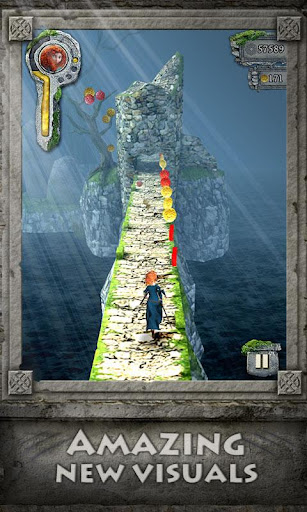
Temple Run Brave is the same thing. Just that you have better and brighter graphics. The new arrow shooting bonus runs are a really good addition to the better version of the game.
Certainly, the game promotes Disney Pixar's Brave, but Imangi Studios have made this game paid on the Google Play.
There have been no lags, and really smooth gameplay.


Available on:
Get it on Google Play badge, large
  Well, Android guys, here is the APK.