Showing posts with label web. Show all posts

Saturday, December 20, 2014

Running the webapp2 framework on Heroku

What is Heroku?

Heroku is a cloud platform that helps in developing and deploying apps written in several programming languages. What I like in Heroku is that it creates a Virtual Environment for every app you publish. So, you can have your own packages and frameworks from the language of your choice. 

What is webapp2?

webapp2 is a lightweight web development framework for Python by Google. It is one of the easiest frameworks to work with in Python. In fact, I started by journey of web development by learning this framework via the Google App Engine

Lets begin!

1) Set up Heroku on your system

I am not going to write much about this, as Heroku has given an awesome Getting Started tutorial for Python here. Follow that link and you will get the basics of the platform and be up and running with a Hello World application in Heroku in about 15 minutes. Yes, just 15 minutes. The tutorial will also talk about something called a Procfile, its a very important part of this project so, just have an idea about what it exactly does. I highly recommend you to follow that tutorial now, if you are new to Heroku. This tutorial follows a unix shell command line interface. 

2) Now, comes the fun part

By this time, you must have installed the Heroku tool belt. 
  1. Create a new folder called hellowebapp. This will be the project folder. All files must reside here.
  2. Now login to heroku.
    $ heroku login
  3. cd to the project directory
    $ cd hellowebapp
  4. Create a virtual environment. If you don't know what this is, follow this link.
    $ virtualenv venv
  5. Activate the virtual environment
  6. $ source venv/bin/activate
  7. Install WebOp, Paste and webapp2 using python's setup tools. We are going to use pip for this tutorial.
  8. $ pip install WebOp
    $ pip install Paste
    $ pip install webapp2
    
  9. Now, create a python file which defines your app. For the sake of the tutorial, we are going to run a simple hello world! example.:
    import webapp2
    
    class HelloWebapp2(webapp2.RequestHandler):
        def get(self):
            self.response.write('Hello, webapp2!')
    
    app = webapp2.WSGIApplication([
        ('/', HelloWebapp2),
    ], debug=True)
    
    def main():
        from paste import httpserver
        httpserver.serve(app, host='127.0.0.1', port='8080')
    
    if __name__ == '__main__':
        main()
    
  10. Create a file called Procfile.txt
    touch Procfile.txt
    nano Procfile.txt
    
  11. Add the following contents to that file and Save it
    web: gunicorn hello:app --log-file=-
  12. Test your app, locally. After the execution of this command, the app will mostly run at http://localhost:5000
    $ foreman start
  13. Copy the list of packages to a file called requirements.txt so that when you deploy, the web server installs the packages automatically. The pip freeze command will come to help.
    $ pip freeze > requirements.txt
  14. Create a git repository and save changes
  15. $ git init
    $ git add .
    $ git commit -m "First!"
    
  16. Create a Heroku app
    $ heroku create
  17. Push contents to cloud
    $ git push heroku master
  18. Lets just run one dyano of the app
     heroku ps:scale web=1 
Ta-da! Your webapp2 powered app is now running on heroku! Now start exploring the framework and continue with the work. Any problems? Just comment below. I will reply asap. If you have problems in setting up Heroku, you can ask that too.

Happy web developing!

Saturday, July 6, 2013

PHP Code Snippets: Generate a random string

Generating random strings might be very useful when developing a website. You can use random strings for various purposes:
2) Generating Coupon codes for a shopping website
And lots more! 
Soon, I will add tutorials to create all the examples that I have mentioned above. But for now, just take a look at the function I have given below:

The variable $length can be set to the length of string that you want to have.

How to use the function?

Just call it whenever you want the random string to interact with the PHP script you are designing.
Ex: $myrand = generatestring(8) // Generates 8 character random string

Explore!

Add more type of characters you wanna include in your PHP script to the variable in the function $charset

More coding at Let's Code.


Wednesday, June 26, 2013

Make yourself secure online: Password Techniques and more..

So, basically to make your house secure, you need well, may be a gun, a security locker for valuable stuff and lots more. When you are on the internet, the only thing you can have is a password. And well, following some guidelines that can help you not getting into trouble and becoming a victim of a cyber crime. Well, you might as not well lose your life, but you know dignity and money are on the line.

Keyloggers:

Place of use: Cyber Cafe
Well, you might think these are outdated and old fashioned, but there are places where keyloggers are used. What keylogger does is that it logs all the keypresses and with a advanced software running in the background, passwords can be known to the person who installed it. Always check for such a thing, this is cuz no law forbids their use.
Solution: Get out of the place if you find something like this

Ctrl+Shift+Delete:

Place of use: All public computers
Always remember to clear all your data, ALL OF IT when work on a public computer is done. Sometimes, logging out does not only do the job. Here how you see the clear browsing data option:
Using Incognito Mode on computers is also an option, but if you even accidently close the windows, all your logins will go. Though more secure, it can sometimes make work complicated. Also change the "Obliterate the following items from" option to your desired one. My choice: "the past day".

Choose a secure password:

Problem: Mostly, passwords on websites are first hashed and then stored on the computer. A specific string(group of characters) has always the same hash code. For example, if your password is "securepassword", and someone else's password is also "securepassword", the same hash will be stored as passwords for your user ID. Hash code is basically conversion of normal English language to a complicated code(of base 16,32 or whatever).
Solution: Choose a password as unique as possible. Don't use phrases like 'iloveyou', 'thisismypassword', 'pass123', etc. etc. Think of something completely unique and then store your password.

If security cracking algorithms are run, the longer your password is more time it will take to finally reveal your password. Use of multi words password is more secure than using single word. Its always better to do so. In fact, using the password 'my password is one that is secret' is more secure than '!@JN#$%J(&%HJDDS'. 

Always devise algorithms to remember your passwords by yourself. This algorithm should also be a secret. I advise to do this because using a secure password algorithm, will help you remember them easily. Algorithm is basically a step by step guide that you remember to store your passwords in your brain.

Check if the website's security is certified:

Any website, just about any website unless the one you trust wholeheartedly, always check for a security certificate. How to do so?
Follow this:
If no verification, just don't submit it at all..

Well, did I miss something, comment it!
Do let me know view on this article, comment!
Ask me something! Ask me tech
Check more on The Tutor

Thursday, June 20, 2013

Best books to kickstart learning web development

A complete beginner to programming and web development? Need something to kick start your learning of the languages that will let you convert your ideas into full featured web apps? Here are three books I recommend that you should start with. Sure you can find PDFs for the same, but I highly recommend you to buy these books, as they have lot of pencil-driven exercises as a part of their course. Also, they incorporate funny methods to keep you interested all time long. In fact, all of us thought that learning programming was just about reading texts and texts, I sure did, but this is certainly something new! They have lots of graphics and hilarious methods of understanding the cores of any language they publish a book about.
Learning PHP:


Both links above have the lowest price that you are gonna ever find on the market. Enjoy!

Monday, June 10, 2013

Two awesome Chrome Web Apps from Google

Ever thought of making a silent comedy or a your own theme? I certainly had, and Google has once again shown its innovation to the fullest by launching two Chrome experiments that uses the HTML5 canvas to bring the first ever Silent Comedy Movie Maker.

1. Peanut Gallery

The silent movie maker that lets you overlap your voice on old movie clips, and using the Web Speech API, you speech is converted into inter clip Title texts. Its really Awesome! Check out the trailer below. Of course you will be interesting to check it out!

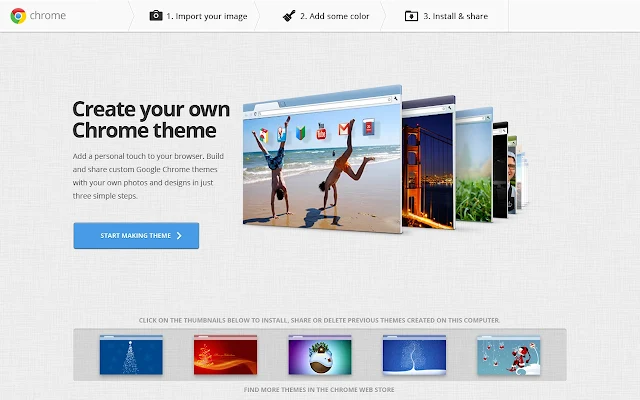
2. My Chrome Theme

Well, the Google Chrome theme maker making the ultimate personalization modification to the browser. The best part that I like is that the Maker just detects colours from the main background you upload and sets the colors using the I'm Feeling Lucky button. Click the image to go to the App details page

Have fun!

Sunday, June 9, 2013

Chrome Web Lab: Something awesome to do with Chrome

Well, Web is Awesome. There are huge lots of stuff you can do. Listing them is, well, something impossible. But how about looking at the web in a really different manner. You can socialize, watch videos and also do various "personal" things.
I mean in the web, there is Facebook, Instagram, Blogger and then there's Chrome Web Lab.
Sketchbot, Teleporter, Web Orchestra and Data tracer! Everything is awesome in its own way.
The Sketchbot draws picture of your's through a robot connected to the internet!
Teleporter imitates sounds and pictures from across the world to let your experience viewing on web in a new realistic fashion
Orchestra lets you create music with people around the world.
Data Tracer gets you info about how the data transmits over the internet!
Absolutely great innovation by Google. Click the image to go there